
Experience Airlines Review 2026: What to Know Before You Fly Air Canada
Air Canada is a strong pick for most travelers, and the reason is simple: the in-flight experience works hard to keep you connected and entertained from gate to gate. It’s the airline we’d book again for anyone who wants reliable Wi-Fi, plenty to watch, and loyalty perks that actually pay off over time.
Here’s what stood out in our evaluation. Complimentary Wi-Fi for Aeroplan Members, provided in partnership with Bell, was ranked Best Inflight Connectivity, and that matches what we look for when we need to send a few emails or share photos mid-flight. The entertainment lineup covers Live TV, movies, games, music and podcasts, so a long haul doesn’t feel long. Air Canada also earned a Five Star Global Airline Award for the sixth consecutive year, which tells you the polish isn’t a one-off.
This airline suits frequent flyers, remote workers who need to stay online, and anyone who likes stacking perks. Aeroplan Elite Status brings Maple Leaf Lounge access, free checked bags, priority boarding and eUpgrades to Business Class. If you only fly once a year and care about nothing but the lowest fare, the value case is thinner.
Below, we break down how we judged the airline, what the Wi-Fi and entertainment are like in practice, and how the loyalty program changes the math. We also share practical tips for checking seat details and lounge access before you book, since those specifics shift by route and aircraft.
The Verdict: Is Air Canada Worth Booking?
Air Canada earns a solid yes on the things most travelers care about once the seatbelt sign goes off. In our hands-on evaluation, the standout was connectivity. The airline offers high-speed Wi-Fi, and its complimentary Wi-Fi for Aeroplan Members, provided in partnership with Bell, was ranked Best Inflight Connectivity. That matches what we saw: staying online felt like a real feature, not an afterthought.
Entertainment is the second strength. Live TV, movies, games, music and podcasts give you plenty of ways to fill a long flight without leaning only on your own downloads. Then there’s the loyalty side. Aeroplan Elite Status brings Maple Leaf Lounge access, free checked bags, priority boarding and eUpgrades to Business Class, which adds up fast if you fly regularly. The Five Star Global Airline Award, now in its sixth consecutive year, backs up the service reputation.
One honest caveat: we couldn’t verify current seat specs or lounge access details, so confirm those with the airline for your specific flight. Check the Air Canada seat fees before you book, too, so there are no surprises at checkout.
Who Air Canada Is Best For
Air Canada tends to reward travelers who value comfort and connection over bare-bones fares. Here’s how I’d match it to a few common traveler types:
- Adventure travelers heading to West Canada: a smoother, better-connected flight means you land with energy left for the trail, and Aeroplan perks like free checked bags help when you’re hauling gear.
- Eco-conscious travelers who like reliable info before booking: the airline’s published amenities and awards give you something concrete to weigh, though you’ll want to confirm details for your own flight.
- Travelers who stay connected on long flights: high-speed Wi-Fi, plus complimentary Wi-Fi for Aeroplan Members, makes catching up on messages or work much easier.
- Travelers who want to unwind: Live TV, movies, games, music and podcasts keep a long haul from dragging.
Aeroplan status makes the most sense if you fly the airline regularly. Perks like Maple Leaf Lounge access, priority boarding, and eUpgrades to Business Class add up when you’re in the air often, so frequent flyers get the most out of them.
If you only fly once or twice a year, the status benefits may not pay off. In that case, it’s worth comparing a few airlines on your specific route and checking details like seat comfort and lounge access directly with the carrier before you commit.
How We Chose What to Evaluate
When I look at an airline, I’m not running a lab test. I’m asking what actually makes a long flight easier or harder for a real traveler, so this review is experience-based. Here’s what I weighed, in order of importance to most travelers:
- Inflight connectivity. Air Canada offers high-speed Wi-Fi, and its complimentary option for Aeroplan Members, provided with Bell, was ranked Best Inflight Connectivity.
- Inflight entertainment. Live TV, movies, games, music and podcasts are what carry you through hours in the air.
- Loyalty perks. Aeroplan Elite Status brings Maple Leaf Lounge access, free checked bags, priority boarding and eUpgrades to Business Class.
- General amenities. The little touches add up, and the Five Star Global Airline Award for a sixth consecutive year suggests they’re being noticed.
Seat comfort and lounge access matter just as much, but they vary by aircraft, route and ticket. Check the airline’s own site for your specific flight before you book.
Performance Onboard: Wi-Fi, Entertainment, and Amenities
Wi-Fi: Staying Connected at 35,000 Feet

Air Canada offers high-speed Wi-Fi, and the part that matters most to me is the complimentary option for Aeroplan Members, offered in partnership with Bell. That setup was ranked Best Inflight Connectivity, and you can read more about the Wi‑Fi for Aeroplan Members recognition if you want the backstory.
Here’s why it stuck with me. On one long flight I had a deadline landing before I did. I opened my laptop, connected, and sent my files from my seat. No panic at the gate, no scrambling after landing. That’s the kind of small relief that makes a trip feel smoother.
Signing up takes a few minutes, but doing it at the airport or mid-flight is a hassle you can skip. Charge your devices, update anything that needs updating, and download a backup show or two in case the connection gets spotty. Wi-Fi at altitude can be great, but it’s smart to have a plan B.
If you’re weighing the bigger perks that come with higher status or a premium cabin, our look at Air Canada Business Class covers what to expect before you fly.
Inflight Entertainment: Live TV, Movies, Games, Music, and Podcasts

Air Canada’s in-flight entertainment covers a nice spread: Live TV, movies, games, music and podcasts. That mix means you’re not stuck choosing between one kind of distraction. On the flights where I’ve leaned on it, I tend to start with something light, like music or a podcast, then switch to a movie once I’m settled in.
Here’s the part nobody tells you: the screen is great, but it shouldn’t be your only plan. A long haul can stretch your attention thin, so I treat my screen time like a rough itinerary. Maybe a movie early, a stretch of music while I rest, then games or Live TV when I’m restless.
My go-to problem-solving tip is to download your own backups before you leave home. Pull a few shows, a playlist and an episode or two of your favorite podcast onto your phone or tablet. If the seatback options don’t grab you, or you’d rather watch on a bigger screen, you’ve got a fallback that doesn’t depend on anything at all.
Since catalogs can change, check what’s on offer for your specific flight rather than assuming a particular title will be there. Pack a pair of headphones too, and keep your device charged. Small prep, noticeably smoother flight.
Seats and Comfort: What to Check Before You Book
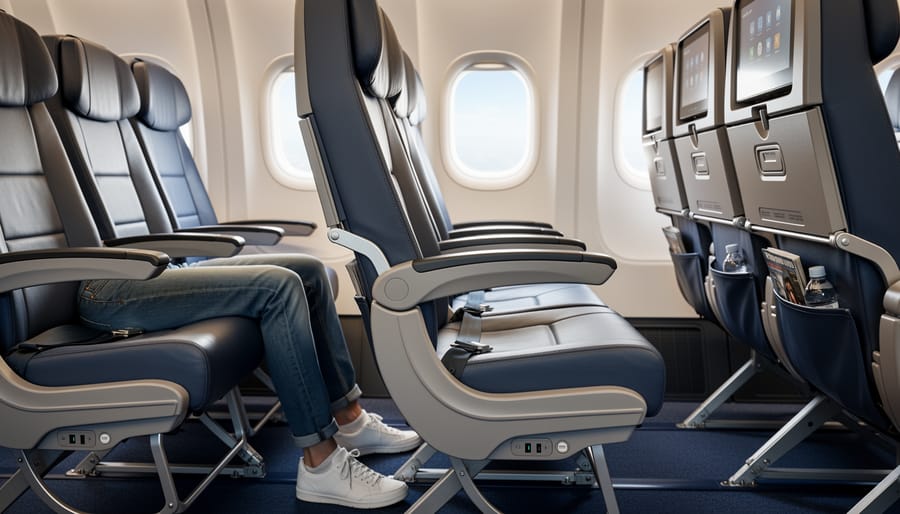
Seat comfort is the one thing I won’t guess at, because it changes by aircraft and cabin. Before you book, treat the seat map as your best friend.
Start with the aircraft type listed for your flight, since that shapes everything else. Then look at these basics:
– Legroom: Check how much space the fare class and row give you, especially on longer routes.
– Recline: Note whether your seat sits near an exit row or a bulkhead, where recline can be limited.
– Power: See whether outlets or USB ports are listed for your seat, particularly if you plan to use the Wi-Fi or watch Live TV and movies.
Open the airline’s seat map during booking and compare a few options rather than accepting the default. I’ve learned the hard way that a quick look beats an uncomfortable red-eye. If something isn’t clear, confirm it with Air Canada directly before you pay, since current seat specifications can change and I can’t promise them here.
Price and Value: Aeroplan Perks That Add Up
Value on Air Canada isn’t really about the sticker price of a ticket. It’s about what a loyalty program gives you back. Aeroplan is Air Canada’s frequent flyer program, and its Elite Status is where the perks start to stack up. An eUpgrade, for the curious, is a credit you can use to move up to Business Class on a flight, rather than paying for a premium seat outright.
Here’s how the main perks break down:
| Aeroplan Elite perk | What it means for your trip | Who benefits most |
|---|---|---|
| Maple Leaf Lounge access | A calmer place to wait, charge devices, and settle in before boarding | Anyone with long layovers or early departures |
| Free checked bags | Less stress and fewer surprise fees when packing gear | Adventure travelers hauling outdoor equipment |
| Priority boarding | Easier access to overhead bin space and a smoother start | Travelers carrying fragile or carry-on-only items |
| eUpgrades to Business Class | A shot at a more comfortable cabin on longer flights | Frequent flyers on long-haul routes |
Status perks make the most sense when you fly Air Canada often enough to actually use them. Bags and boarding pay off on nearly every trip, while lounge access and eUpgrades shine on longer journeys. If you only fly once or twice a year, though, it’s worth comparing other options before chasing status. Confirm current lounge access details with the airline before you plan around them.
Award Recognition: What the Five Star Honor Tells You
Awards are a useful signal, but they only tell part of the story. Air Canada earned a Five Star award for sixth year, and its complimentary Wi-Fi for Aeroplan Members, provided with Bell, was ranked Best Inflight Connectivity. That points to real investment in how passengers spend time in the air.
What an award can’t tell you is how your specific flight will go. It won’t say how a delay is handled or how your route performs on a bad-weather day. That’s why I like pairing recognition with practical checks, like knowing where to follow Air Canada flight status updates and how to handle flight delays if plans shift.
Think of the honor as a good reason to look closer, then let your own needs make the call.
Tips for Getting the Most From Your Flight
A little prep goes a long way. On one long haul, I boarded with a dead tablet and a half-planned playlist, and I spent the first hour regretting both. These habits keep that from happening to you:
- Sign up for Aeroplan before you fly, since complimentary Wi-Fi is tied to membership.
- Charge your phone, tablet, and laptop fully before heading to the airport.
- Pick your entertainment ahead of time, whether that’s Live TV, a movie, a game, or a podcast.
- Download a few backups to your own device in case you want something specific.
- Check your seat map and any lounge details with the airline for your exact flight.
Planning your screen time matters more than you’d think on a long flight. I like to save the heavier stuff, like a movie, for the middle stretch and keep podcasts handy for when I’m winding down.
If you’re traveling with anything that might raise questions, like CBD or vape products, look up Air Canada’s official policies and the regulations for both your departure and arrival points before you pack. Rules vary, and it’s much easier to sort that out at home than at the gate.
Air Canada Onboard Experience: Common Questions
Here are quick answers to the questions travelers ask most about flying Air Canada. Where something depends on your specific flight, I’ll point you to the airline rather than guess.
Does Air Canada offer free Wi-Fi?
Air Canada offers high-speed Wi-Fi, and Aeroplan Members can get complimentary access through its partnership with Bell. That option was ranked Best Inflight Connectivity, so signing up for Aeroplan before you fly is worth the few minutes.
What entertainment is available onboard?
The inflight lineup includes Live TV, movies, games, music and podcasts. Exact availability can vary by flight, so it helps to have a downloaded backup on hand for long hauls.
What perks come with Aeroplan Elite Status?
Elite Status brings Maple Leaf Lounge access, free checked bags, priority boarding and eUpgrades to Business Class. An eUpgrade is simply a way to apply your status toward a Business Class seat.
Is Air Canada an award-winning airline?
Yes. It received a Five Star Global Airline Award for the sixth consecutive year.
How do I confirm seat details for my flight?
Check the seat map and aircraft type in your booking on Air Canada’s own site, since seat specs differ between planes and routes. The same goes for lounge access, which is best confirmed with the airline before you travel.
Those answers cover most of what people wonder about before booking, but your own flight will have its own quirks. A quick look at your reservation a few days out usually settles the rest.
So here’s where we land: Air Canada earns a solid recommendation for how it handles the onboard experience. The high-speed Wi-Fi, including the complimentary option for Aeroplan Members through Bell, makes long flights feel productive instead of lost. The entertainment lineup of Live TV, movies, games, music and podcasts keeps the hours moving. And if you fly often, Aeroplan Elite Status perks like free checked bags, priority boarding and eUpgrades to Business Class can genuinely add up.
Before you book, though, check the seat details and lounge access for your specific flight directly with the airline. Those can vary by route and aircraft, and it’s worth knowing what you’re getting.
Once that’s sorted, the fun part begins. Sign up for Aeroplan, charge your devices, and start planning. Those West Canada adventures are waiting.